// case study · lekta ai platform · ai-augmented design
Revision Tool
How a multi-step ML release process became one button — designed with AI in the loop.
- role
- Senior Product Designer · sole designer
- scope
- 0→1 — new module, previously manual dev work
- platform
- Lekta — voice & text bots for banking and telco
- team
- fullstack devs · CTO
- process
- AI-augmented (GPT · v0)
// problem
Teams implementing bots couldn't test and publish model versions on their own — every change needed developer support, creating delays, version mismatches and bottlenecks.
// approach
Understand the backend deeply enough to hide it: hours of technical conversations, a full state map, then a UI that exposes one action instead of twelve states. AI worked as domain expert, system thinker and red team.
// outcome
Releases moved from developers to product people — down to a per-sprint ritual. Honest UI under ML constraints, consistent with the platform.
fig. 01
context
Revision Tool is one module within Lekta — an enterprise platform for building and managing voice and text bots used in banking and telco. Changes made across all platform modules flow into Revision Tool as a draft revision — visible to the user only after training is complete. Before this module existed, every release required manual developer intervention.
// data flow — how changes reach the tool
Dialog Designer
dialogue logic & flows
Conversations
ML model improvements & review
Bot Reactions
bot response editing (NLG)
Revision Tool
all changes arrive as a draft revision — one button away from production
fig. 02
problem
The backend had 12+ states.
The user needed to see one action.
// constraints
- training time unpredictable — grows with model complexity
- no real-time backend progress to show
- environments hardcoded per client in v1
- platform design system compliance
- non-technical users had to operate it without documentation
fig. 03
process
// reasoning trace — each step follows from the one before
Understanding the system
Many hours of technical conversations with fullstack developers — what triggers a freeze, how training connects to model versions, how environments map to clients.
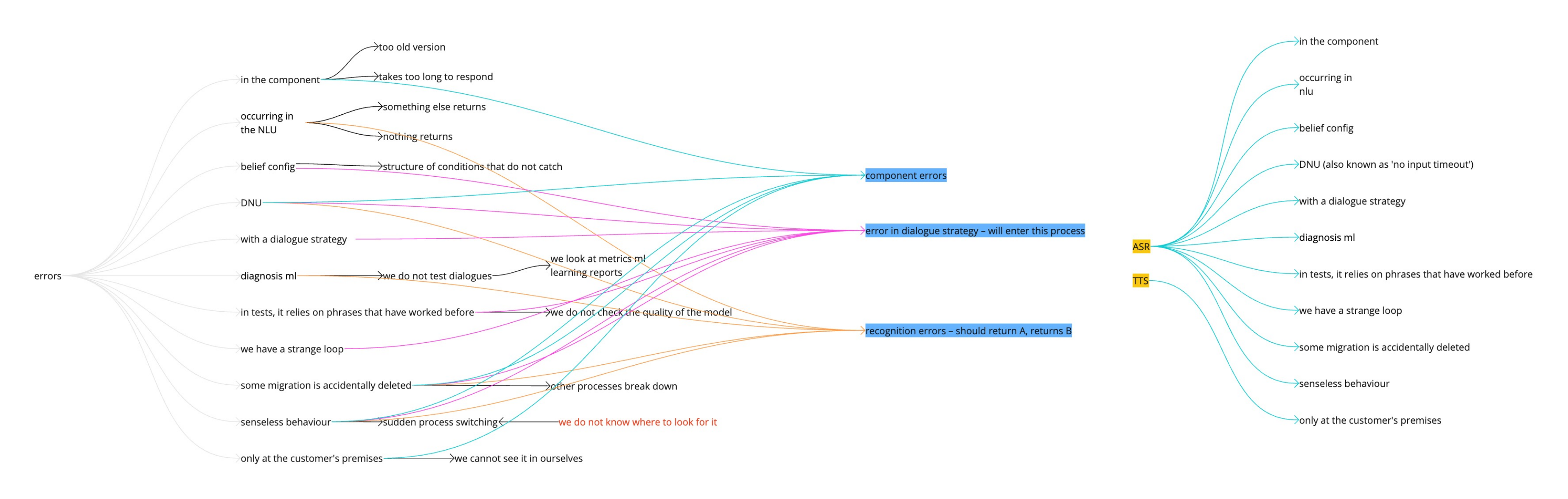
// the backend surface I had to absorb
freezequeuetrainvalidateversionassigndeployrollbackerrorretrylockdiff…12+ states · learned from hours of dev conversations
◈ how AI helped here◈ collapse
◈ AI as Domain Expert — I used AI to validate whether I had correctly translated backend logic into design thinking. The risk is over-trusting outputs: every hypothesis still needed human validation against what the devs actually said.
Mapping dependencies
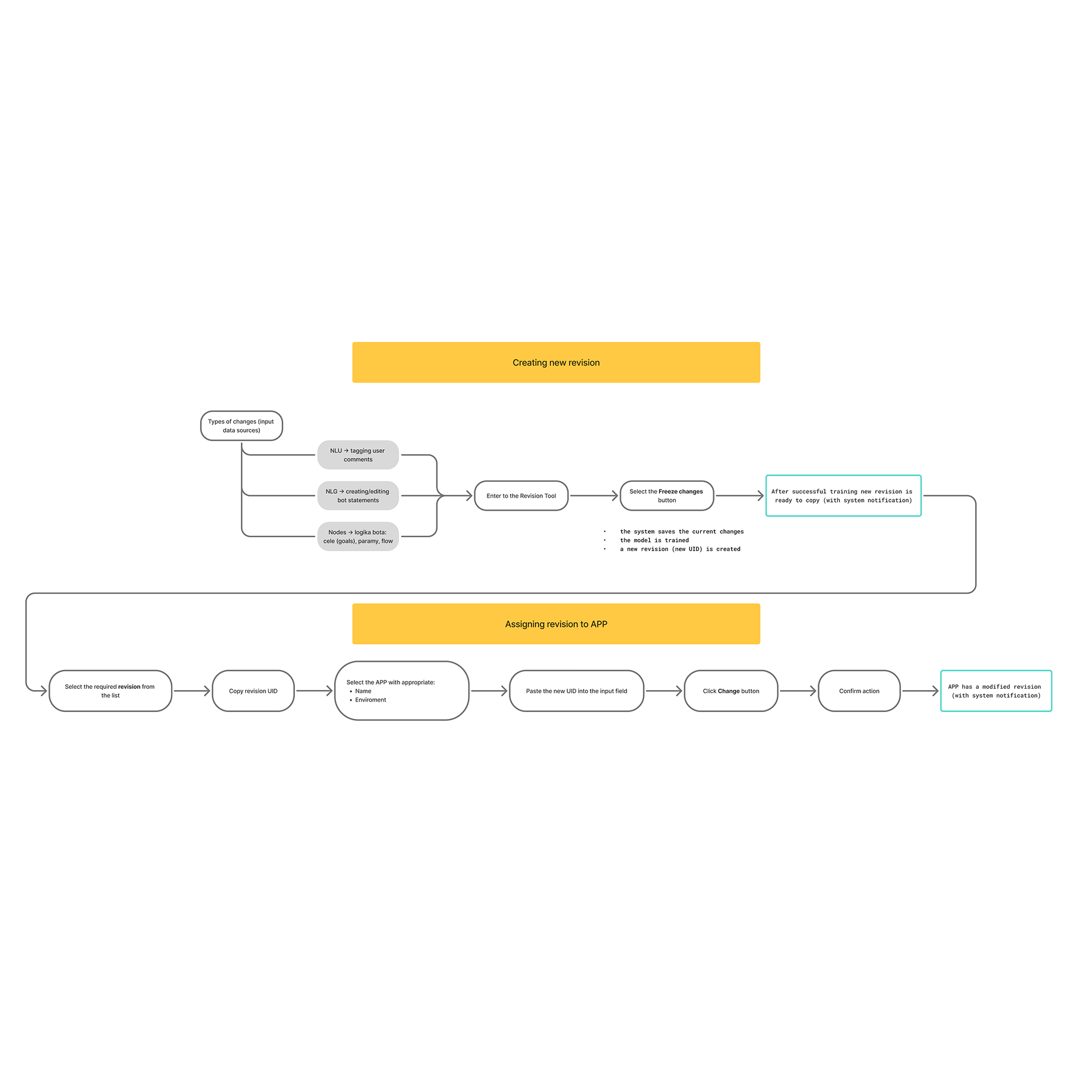
The full state diagram: what triggers freeze, what happens during training, what blocks assignment, what the user sees when training fails.
// state machine
Freeze changes↓ creates
Draft revisiontraining starts automatically↓ training result
● success — id copyable● error — check logs↓ assign to app
Appcurrent: rev_20240312_143AChangerevision id…Save↓ deployed to
ProductionStagingDevelopment◈ how AI helped here◈ collapse
◈ AI as System Thinker — mapping 12+ states and their transitions revealed which states were meaningful to users (exactly one: 'done') and which were backend implementation detail.
Eliminating complexity
Early UI sketches in v0 with all backend steps visible — progress indicators, state labels, multi-step flows. The result was immediately clear: exposing backend states created cognitive overload.
// what the user could have seen → what they saw
state: freezing
training 3 / 12
queue position 4
model v2.1.7
validating nodes
env mapping
→
Freeze changes12 states → 1 action · all backend complexity hidden
◈ how AI helped here◈ collapse
◈ AI — Explain Like I'm 10 — I stress-tested every label, button and status message. If a sentence needed backend knowledge to understand, it didn't ship.
Stress-testing before handoff
Surfacing edge cases before developers found them: what if training fails? Can a failed revision reach production? What does a long training with no progress data look like?
// adversarial questions, before QA could ask them
? what if training fails?
→ error state — no false progress bar
? can a failed revision ship?
→ blocked from production
? long training, no progress data?
→ honest end-state message
◈ how AI helped here◈ collapse
◈ AI as Critic / Red Team — adversarial questions against my own design. Cheaper than finding the same holes in QA — or in a client demo.
// ai in the loop — four roles, one rule: it accelerates thinking, it doesn't replace it
◈ domain expert
validated my translation of backend logic into design decisions
◈ system thinker
mapped states, transitions and dependencies into one diagram
◈ explain like i'm 10
stress-tested every label and message for non-technical users
◈ critic / red team
attacked the design with edge cases before handoff
// key insight
The more I understood the backend, the less I showed of it.
// before
// after
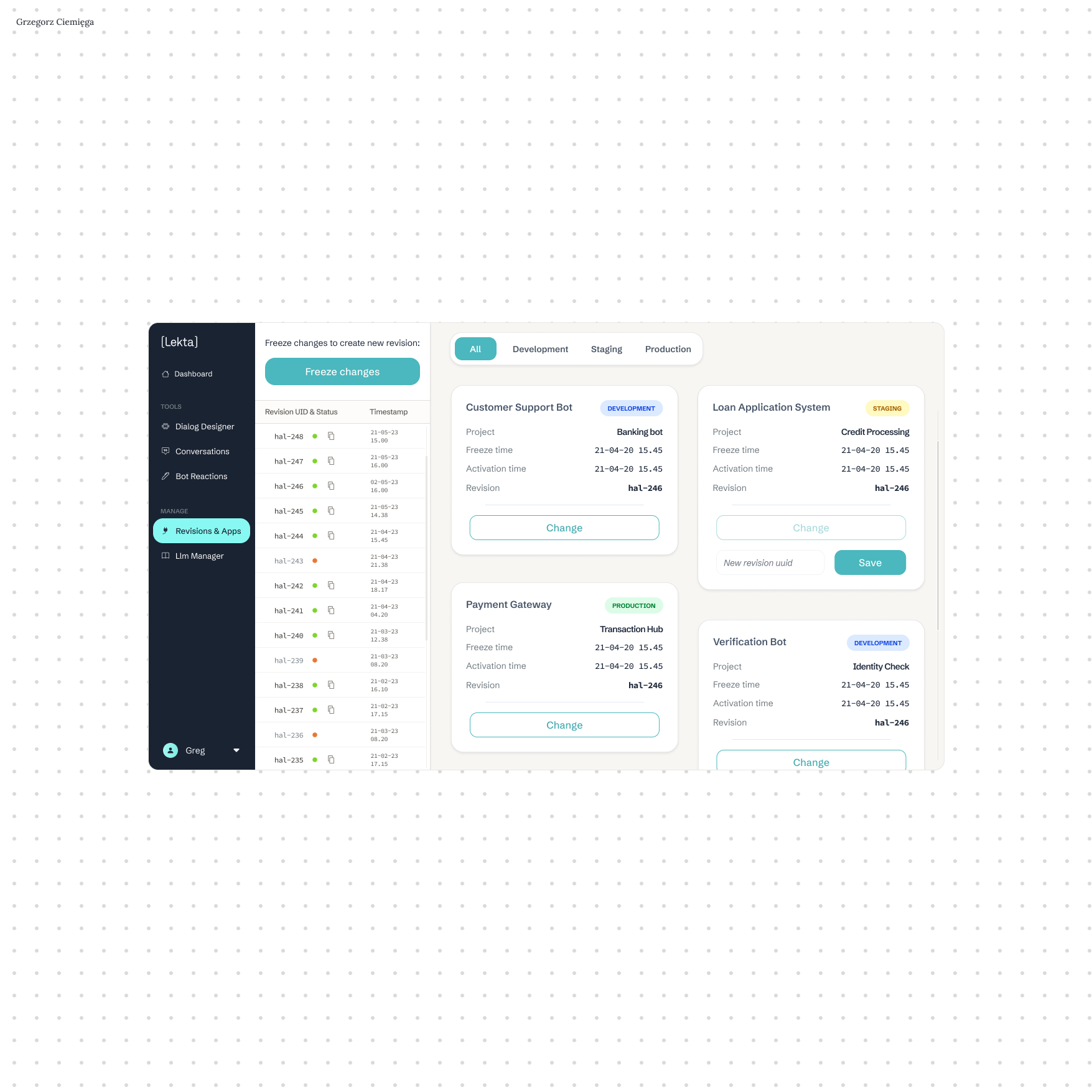
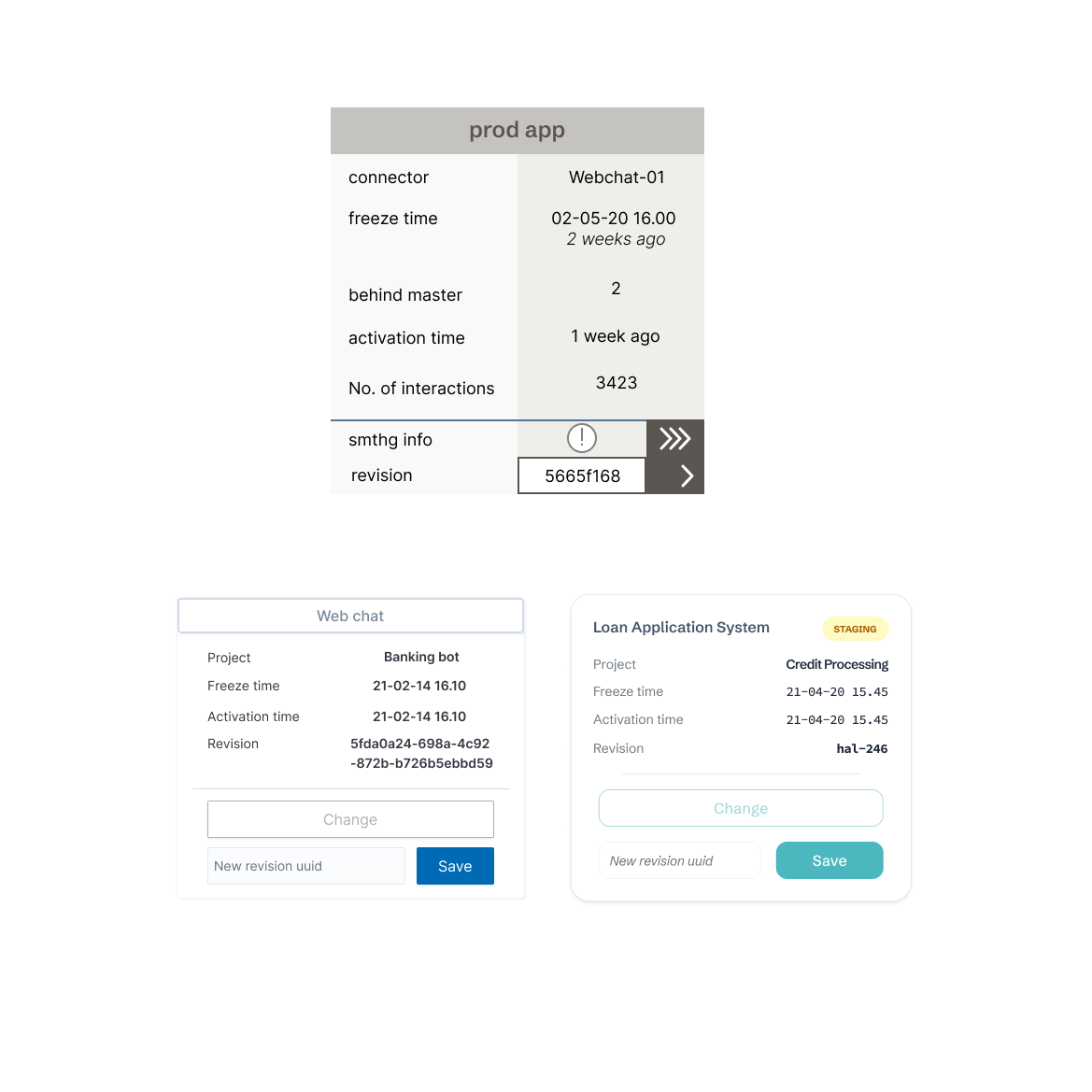
// same logic. different cognitive load.
fig. 04
outcome
Ownership without dev dependency
Each client had a designated person responsible for releases — frequent at project start, down to once per sprint in mature projects. All without developer involvement.
// releases shifted from a developer task to a product ritual
Honest UI under ML constraints
Training time was unpredictable — a progress bar would have lied. Instead: no false indicator, a simple end-state message, and the new revision appearing in the list as confirmation.
// users stopped asking 'is it done?' — the list answered for them
Consistent system, unique module
The only module with custom components driven by its unique data model. Typography, color and information patterns stayed consistent — layout and interaction logic were built from scratch.
// a new interaction pattern that didn't break the system it lived in
fig. 05
reflections
Limitations of AI in this process
AI was a thinking partner, not a shortcut. It couldn't replace hours of technical conversations with developers — it could only help verify whether I understood them correctly. What used to take weeks of back-and-forth took hours to verify; the speed was in validation, not in replacing the conversations.
What post-MVP could look like
Revision diff analysis — showing exactly what changed between NLU, NLG and Dialog versions — was the most requested next feature. Configurable environments were the clear second. Both were conscious cuts: a stable v1 that ships is worth more than a perfect v1 that doesn't.
You ask the kind of questions that change my point of view.
Have a complex product that needs clarity?
Open to a long-term B2B contract, a freelance project, or a one-off consultation.
or reach me directly: